Update from your shops and Check now
Once a listing is posted, things can change on the marketplace: you might lower the price there, or the item might sell. Poof! can read one of your listings to catch up, but only when you ask.
What Poof! reads, and when
Poof! reads Vinted and Facebook Marketplace listings, one listing at a time, only when you press a button:
- Sync with Vinted (or Sync with Facebook Marketplace) in the marketplace's row on the item's Listings tab;
- Read again in the Update from your shops list;
- Check now in the alerts bell.
There is no daily or automatic reading, and no button that reads every listing at once. ThredUp and Poshmark listings are not read this way.
Poof! uses the listing link you saved, reads the public page without your sign-in, and does not pretend to be anything other than Poof!. Each read is kept with its time and what happened.
After a listing has gone 7 days without a check, the bell reminds you, at most once a week, and lists each such listing with its own Check now.
When a read is blocked
Marketplaces sometimes refuse to let a page be read. Poof! then says so plainly, for example "Vinted didn’t let Poof! read this listing just now · try again later". A blocked, failed or partial read changes nothing in Poof!. A listing that can't be read is never taken as sold.
The review list
Home's Update from your shops card opens one list of everything your listings show that Poof! is missing or has differently. Nothing in it changes your listings on the marketplaces.
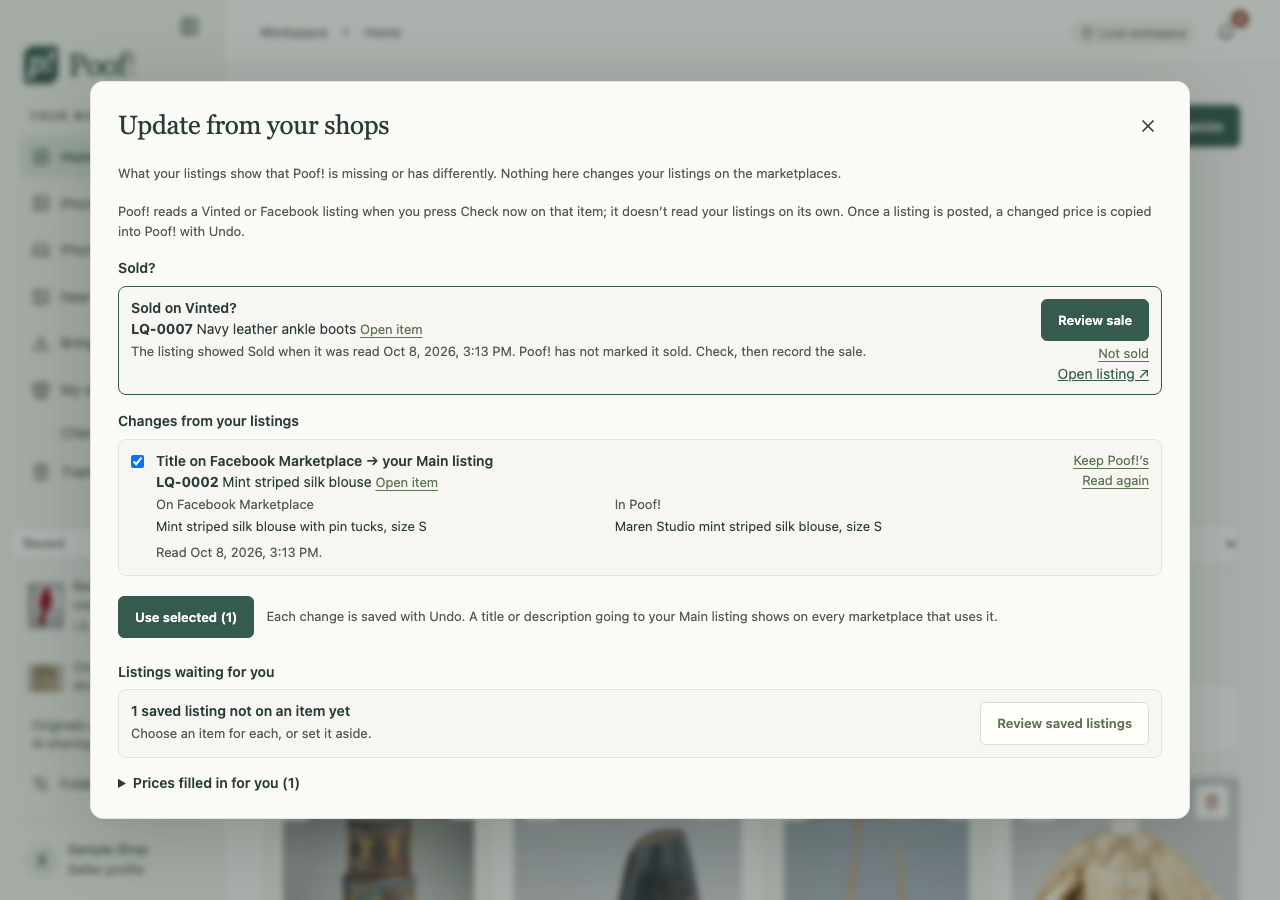
- Sold? A listing that showed Sold appears as "Sold on …?". Review sale opens the usual sale form with that marketplace chosen; Not sold dismisses it. Nothing is marked sold until you confirm the sale form.
- Changes from your listings: a title or description the listing shows differently. Rows are ticked in advance only when the read was complete. Use selected saves the ticked rows, with Undo. Keep Poof!’s keeps what Poof! has.
- Listings waiting for you: saved listings not on an item yet, and imported listings missing details.
- Could not be read, each with Read again.
- Prices filled in for you: prices Poof! filled in or copied, each with Undo.
Prices on posted listings
Once a listing is posted, its marketplace is where the price lives:
- If Poof! has no price for that marketplace and a complete read finds one, Poof! saves it.
- If a complete read finds a different price from Poof!'s, Poof! copies the new price in, as long as the read is newer than your own last change to that price.
Each change shows in the bell (for example "Vinted price changed $45 → $39") with Undo. A price you undo is not filled in again. Poof! never changes a price on a marketplace that is not recorded as posted, and never on a sold item.
Wording
A complete read can fill a Main listing that is still completely empty, once, with Undo. Any other difference in title or description waits in the review list for you.